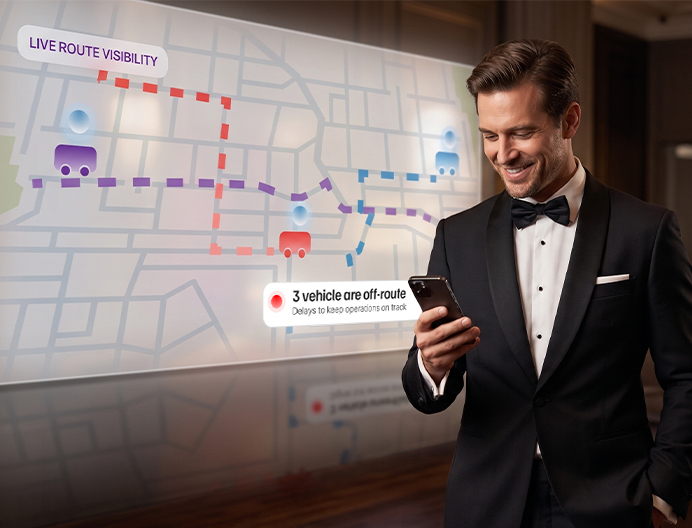
When thousands of people, hundreds of vehicles and multiple venues move at once, you can’t run on phone calls, radio updates and spreadsheets. EventFalcon brings your entire transport operation into one live command center.
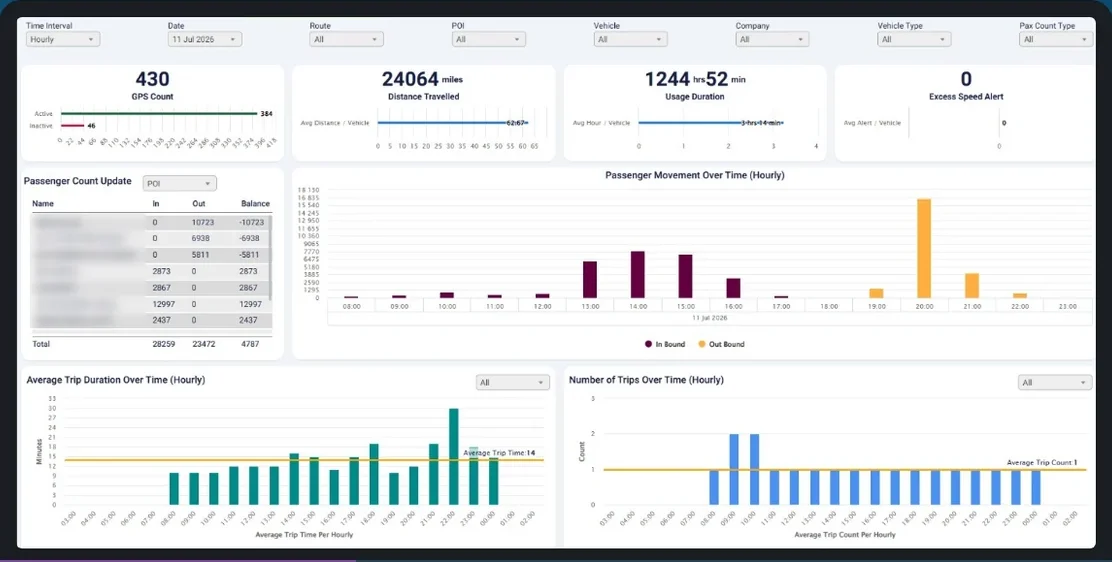
One stadium event day. 384 live trackers, 51,731 passengers, 24,064 miles and 1,244 fleet hours, with 14-minute average trips and zero speed alerts.
A shuttle gets delayed. Traffic builds at a venue entrance. A VIP vehicle runs late. A road closes. The question isn’t whether something will change. It’s whether your team will know early enough to act.
"Where is the bus?"
Updates arrive after the delay has already happened.
"Has the vehicle left yet?"
Confirming position means calling one driver at a time.
"Can someone confirm if the driver has arrived?"
Fragmented chats with no single source of truth.
"Which vehicle is on this route?"
Static plans that can't keep up with a live event.
"Are we still on schedule?"
ETAs built from driver guesses, not live location data.
"What actually happened?"
Reports pieced together by hand from memory and notes.
Still deciding between spreadsheets, radios and a platform? Read our build vs. buy guide for event transport.
EventFalcon’s command center puts nine live capabilities on one screen. Each row below shows what your team sees and what they can do about it, from the first vehicle out to the last one back after the event.
| Capability | What you see | What you can do |
|---|---|---|
| Live GPS tracking | Every event vehicle on one live map | Find any vehicle without calling the driver |
| Route and geofence monitoring | Alerts when a vehicle leaves its route, or arrives at or departs from a set area | Fix a wrong turn or a missed stop while there is still time |
| Arrival time estimates | Expected arrival and travel times for each key location | Spot late vehicles before a queue builds |
| Passenger flow | Passengers moving in and out at each pickup point, counted by staff on a phone web app | Send more vehicles to busy pickup points |
| VIP movement tracking | VIP and high-priority vehicles in their own view | Coordinate VIP arrivals and departures with exact timing |
| Multi-fleet view | Shuttles, coaches, VIP cars and staff vehicles on the same screen | Run every fleet from one place, even with different vendors |
| Asset tracking | Equipment and high-value items on the move, using battery-powered trackers | Keep track of gear without installing anything permanently |
| Post-event reports | Route performance, vehicle use and passenger numbers | Plan the next event using real data |
| Sustainability reports | ESG-ready reports based on vehicle movement and use | Support your event's sustainability reporting |
Want the full feature list? See everything in the EventFalcon platform.
A command center is only useful when information moves quickly from the field to the people making decisions.
One loop, running all event day
 LIVE COMMAND CENTER
STEP 1 OF 4
See
Hover or tap a step to explore.
From a vehicle moving on the road to a decision in the command center
Hover or tap a step to explore.
What your team watches, from the first vehicle out to the last one back
Before the first bus goes on route, know the operation is actually ready.
What your team watchesOperational advantage: start with visibility instead of assumptions.
If one pickup location sees rising demand while another stays quiet, you can redeploy fleet and route support with confidence.
What your team watchesOperational advantage: see the pressure before the queue becomes the problem.
Your team doesn't need to ask "Why didn't bus 120 show up?" They can see it off-route on the map.
What your team watchesOperational advantage: one operational view for the whole team.
The event isn't over when the final whistle blows. Monitor passenger movement, spot congestion and see how transport performs as attendees leave.
Exit routeVenue → Gates → Parking → Hotels → Transport Hubs
Operational advantage: visibility through the toughest window.
Review route performance, vehicle use and passenger numbers, then plan the next event with real data.
What your team watchesWhich post-event metrics to track →
Operational advantage: walk into the debrief with real numbers, not memory.
Every team works from the same live data. Each one watches the part that matters to them.
Command CenterSAME LIVE DATAVehicles, routes, arrival times and alerts
Arrivals, people inside and departures
VIP vehicles, live location and arrival time
Passenger flow, trip times and demand
Fleet use, emissions and event performance
You are not simply moving vehicles. You are coordinating people, schedules, venues, routes, VIPs, teams, vendors and parking, often at the same time.
See where demand is building and where vehicles are needed.
Performance insight without waiting for end-of-day reports.
See how EventFalcon works for stadium and venue transport managers, event transport coordinators and independent event transport consultants.
You are not simply moving vehicles. You are coordinating people, schedules, venues, routes, VIPs, teams, vendors and parking, often at the same time.
See → Understand → Decide → Act
Designed around live event complexity.
Live data your team can decide with.
Plan routes, configure locations, set geofences, deploy vehicles.
Track vehicles, monitor routes, watch passenger flow, manage VIPs, respond to alerts.
Review routes, analyze utilization, measure passenger movement, evaluate performance.
Straight answers about running event transport from one live command center.
An event transport command center (also called an event command centre) is one place where a team watches every vehicle, route and passenger movement during an event. Read our full guide on how a command center works.
EventFalcon supports event transport command centers with one live platform. It includes:
EventFalcon monitors live event operations through GPS trackers on each vehicle. The trackers send live locations to one map. Teams see where each vehicle is, whether it is on its route and when it will arrive. Staff record passengers getting on and off through a simple web app on their phones.
EventFalcon helps event teams make transport decisions with four tools:
Major events manage transport from a central command center in three steps. With EventFalcon:
Yes. It is designed for stadium events, major sporting events, motorsports, concerts, festivals, expos and multi-venue operations.
Send us your past event data: routes, fleet and stops. We’ll simulate it live in our dashboard, so you see exactly how EventFalcon would have run your operation. Before you commit a dollar.
Prefer to talk it through? sales@eventfalcon.com · +1 725 500 0012
Send us your past event data — routes, fleet, stops. We’ll simulate it live in our dashboard, so you’ll see exactly how EventFalcon would have run your operation. Before you commit a dollar.